Optical network planning software

LuminaDWDM Simulator Software

Design, analyze, and validate optical networks before deployment

Build Dense Wavelength Division Multiplexing networks on a visual canvas, then evaluate optical power, per-channel OSNR, engineering margin, and fault resilience with a physics-based simulation engine.

From concept to commissioning — design optical networks with confidence.

Watch Product Tour Explore Knowledge Base View Pricing

A practical DWDM simulator for end-to-end optical network engineering

Lumina combines network topology design and optical-layer analysis in one desktop simulation environment. Engineers can model transmitters, receivers, fiber spans, amplifiers, multiplexers, and ROADMs as a complete route instead of calculating each element in isolation.

Use the simulator to explore design choices, identify weak margins, compare channel performance, and test failure scenarios before equipment is commissioned in the field.

  • Visual topology design
  • Optical power budgets
  • Per-channel OSNR analysis
  • Fault and resilience testing
See it in motion

Build, test, and inspect the entire optical path.

DWDM engineering knowledge base

Learn the signal. Design the optical route.

Eight practical chapters connect networking fundamentals, light behavior, DWDM architecture, link engineering, and day-to-day operations.

Use the filters to move from theory to field practice, then open Lumina to apply each concept on a visual network.

01
Network foundations

OSI layers and switched networks

The OSI model separates communication into seven layers so protocols and devices can interoperate, evolve independently, and be troubleshot by function.

  • The Physical layer carries bits, while the Data Link, Network, and Transport layers handle frames, packets, path selection, reliability, and flow control.
  • Packet switching shares links and lets routers forward each packet independently, so packets can follow different routes or arrive out of order.
  • Circuit switching reserves a fixed, exclusive path for a session; setup takes time and idle capacity remains unavailable to other traffic.

Translate layered network thinking into an optical topology.

Model it in Lumina
02
Optical physics

How light travels through fiber

Optical networks encode parallel data streams on distinct wavelengths. Fiber confines that light because its core has a higher refractive index than its cladding.

  • Total internal reflection keeps correctly launched light inside the core as it travels along the fiber.
  • Attenuation weakens the signal, dispersion spreads pulses, polarization changes component interactions, and nonlinear effects can create distortion or crosstalk.
  • DWDM commonly operates near 1550 nm, while single-mode fiber limits propagation to one path and reduces long-distance dispersion.

See how physical impairments change a simulated link.

Test light behavior
03
DWDM architecture

Dense wavelength multiplexing

DWDM places many tightly spaced wavelength channels on one fiber, concentrating high-capacity services in the low-loss C- and L-band regions.

  • Compared with CWDM, DWDM uses narrower channel spacing, supports many more channels, and uses precision lasers plus amplification for long-haul transmission.
  • EDFAs amplify multiple wavelengths at once; Raman amplification distributes gain through the transmission fiber and can cover a broader wavelength range.
  • Dispersion compensation protects pulse shape, while the Optical Supervisory Channel carries monitoring, alarms, configuration, and inventory traffic independently of service channels.

Build a multi-channel system and inspect every stage.

Design a DWDM route
04
Transmission media

Fiber, connectors, and transceivers

Fiber selection sets the limits for distance, dispersion, nonlinear behavior, and installation practice across the optical path.

  • Single-mode fiber has an 8–10 micron core and is preferred for long-distance DWDM; multimode fiber has a larger core but higher modal dispersion and attenuation.
  • NZDSF keeps a small, controlled amount of dispersion near 1550 nm to reduce four-wave mixing while supporting long-haul C- and L-band systems.
  • Connectors, patch cords, optical distribution frames, and fixed or tunable DWDM transceivers complete the path from equipment shelf to line fiber.

Choose media and equipment before committing a design.

Configure the link
05
Control and switching

OTN, FOADM, ROADM, and ASON

Modern optical networks combine framed transport, wavelength add/drop functions, and automated control to move services efficiently and recover from change.

  • OTN wraps client signals into a hierarchy that supports multiplexing, performance monitoring, and forward error correction.
  • FOADM uses fixed filters for predetermined wavelengths; ROADM uses wavelength-selective switching to add, drop, pass, or reroute channels under remote control.
  • ASON separates transport, control, and management planes to automate provisioning, traffic engineering, routing, resource allocation, and restoration.

Explore dynamic wavelength paths and restoration choices.

Simulate switching
06
Link engineering

Optical power calculation

Power planning tracks absolute optical levels in mW or dBm and expresses gain or attenuation as relative dB changes along the route.

  • 0 dBm equals 1 mW, and dBm converts to milliwatts with P(mW) = 1 mW × 10P(dBm)/10.
  • Insertion loss is the difference between component input and output power; amplifier gain is output power minus input power.
  • Power balancing accounts for transponder launch power, MUX/DEMUX loss, fiber interfaces, ROADMs, DCMs, amplifiers, attenuators, and channel-to-channel power difference.

Replace spreadsheet arithmetic with a visual power budget.

Calculate in Lumina
07
Network design

Capacity, modulation, and spectrum

DWDM design balances reach, capacity, resilience, spectrum use, equipment choice, and the operational demands of the intended topology.

  • QPSK prioritizes noise tolerance, while 8QAM, 16QAM, and 64QAM increase bits per symbol and spectral efficiency at progressively higher SNR requirements.
  • Coherent detection recovers amplitude, phase, and polarization and combines advanced modulation, polarization multiplexing, and DSP for high-capacity long-distance transport.
  • Fixed Grid uses fixed 50 or 100 GHz spacing; Flexible Grid divides spectrum into smaller slices so high-speed signals can occupy adjustable bandwidth.

Compare reach, channel plans, and topology options visually.

Plan network capacity
08
Field operations

Maintain a healthy optical network

Reliable operation depends on controlling link loss, documenting span performance, protecting equipment conditions, and using the right measurement tools.

  • Fiber-loss optimization tracks backbone attenuation, connectors, hard patches, splices, and patch cords across each end-to-end span.
  • Clean capped connectors, correct patch-cord routing, ESD grounding, power backup, and a 22–25°C equipment-room temperature support stable performance.
  • An OTDR locates bends, splices, patches, and breaks by distance; an optical power meter measures wavelength-specific signal levels in dBm.

Practice fault isolation before an outage reaches the field.

Run a fault scenario
No concepts match that search. Try a broader optical term.

Product Overview

Lumina is a professional-grade DWDM (Dense Wavelength Division Multiplexing) network simulator built for telecom engineers, network planners, and optical networking students. It provides a visual drag-and-drop canvas where you design networks using real-world shelf-based equipment, then run physics-accurate simulations to validate power budgets, OSNR margins, and fault resilience — before deploying a single fiber.

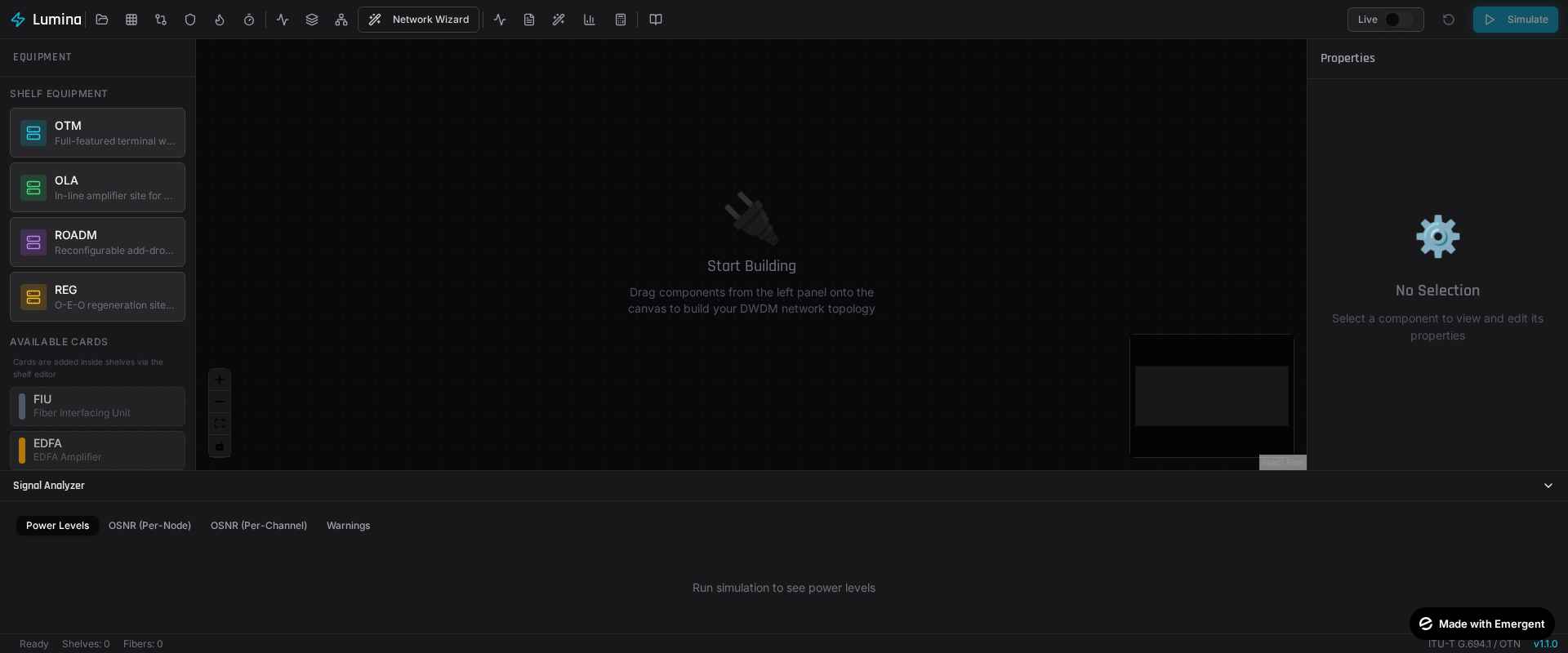
Main Console View

Monitor your entire network operation from a centralized command center. The Main Console View gives you a comprehensive workspace to access system metrics, manage topology configurations, and oversee high-level network status in a unified dashboard.

Lumina DWDM Simulator main console with visual optical network workspace

Centralized command center and main operations console.

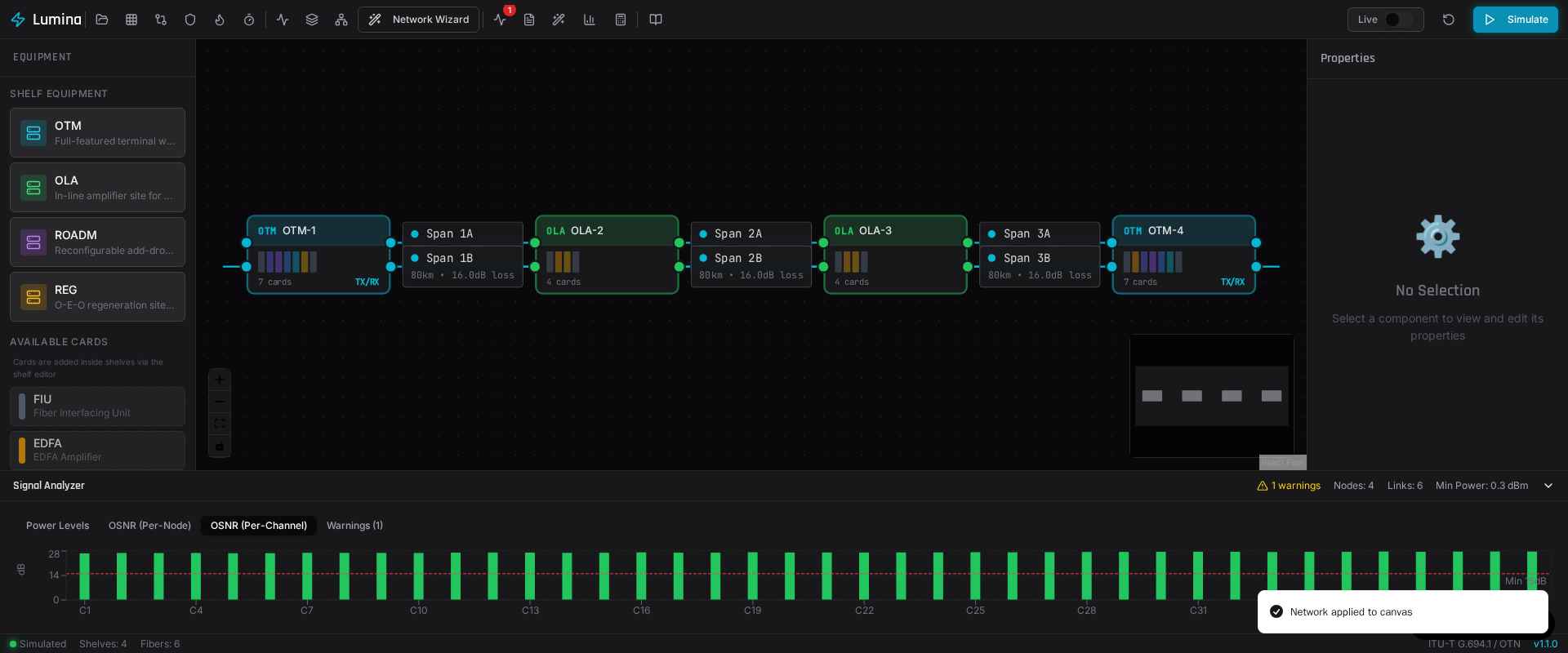
Auto Network Provisioning

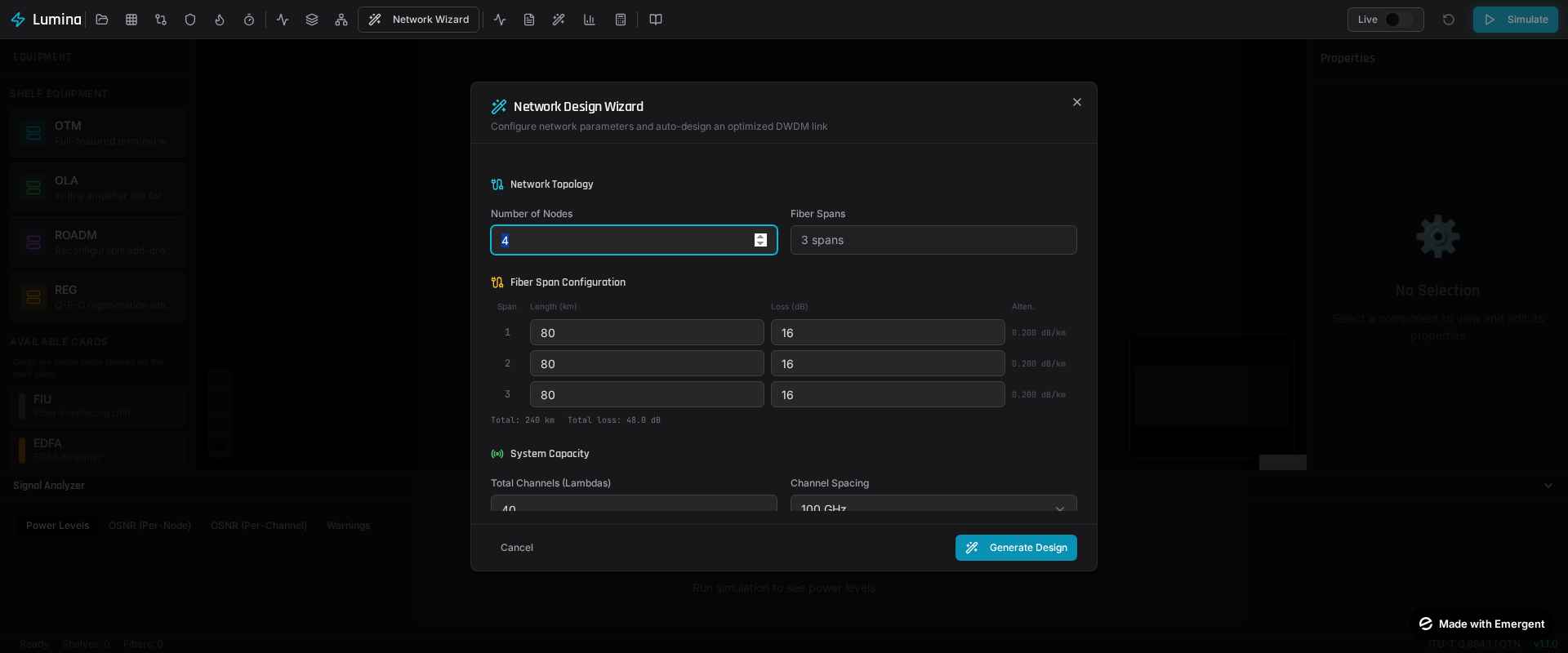
Stop spending hours manually placing components. Lumina's auto-provisioning wizard generates complete, optimized DWDM networks from just a few parameters. Instantly configure the number of nodes, fiber spans, attenuation limits, and system capacity to deploy your topology in seconds.

DWDM Network Wizard configuring nodes, fiber spans, and wavelength channels

Automated network design and provisioning.

Physics-Based Simulation Engine

Lumina's simulation engine processes signals through each card in sequence, modeling real physical effects:

  • Optical Power: dBm at every node, accounting for fiber loss, connector/splice loss, EDFA gain, MUX/DEMUX insertion loss.
  • OSNR: Cumulative ASE noise tracking through every amplifier stage.
  • Per-Channel Analysis: OSNR per ITU-T C-band channel (C1-C44).
Per-channel OSNR analysis across the full DWDM C-band

Per-channel OSNR across the full C-band.

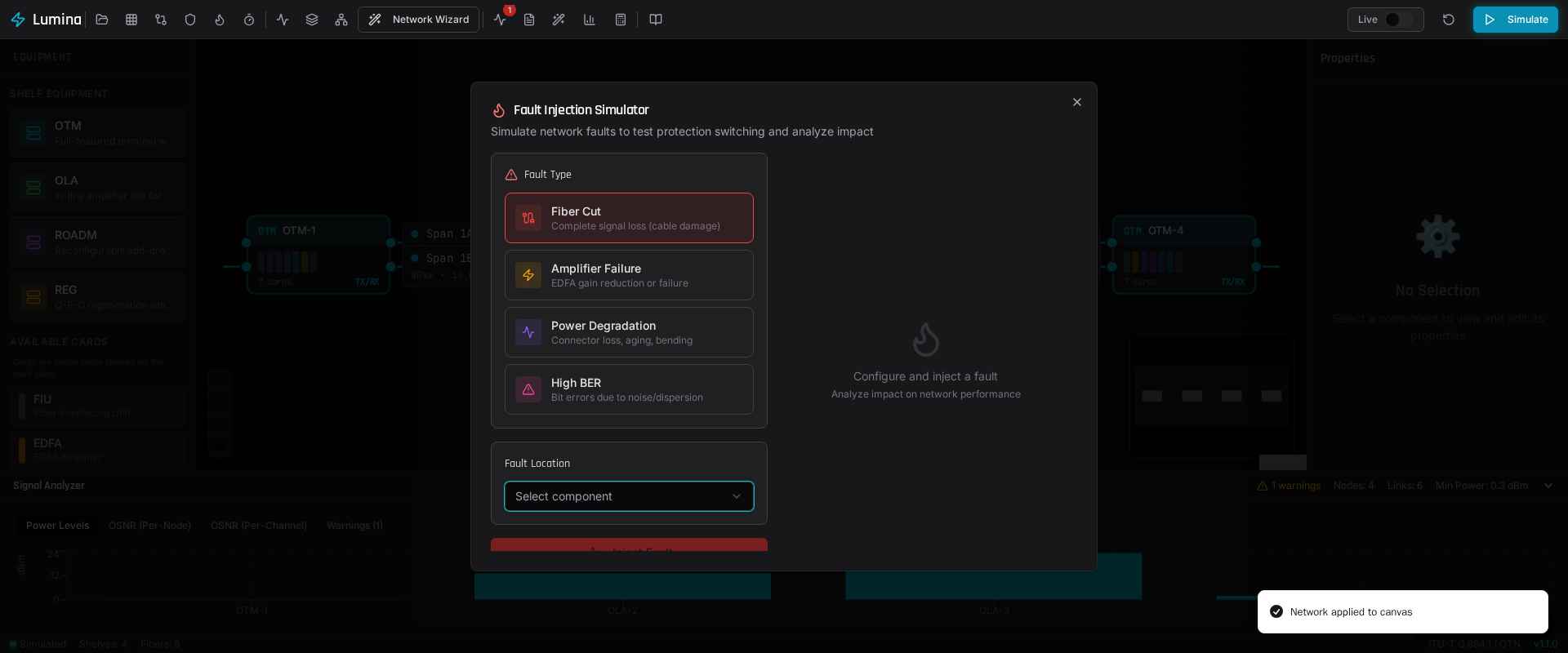
Fault Injection & Resilience Testing

Test your network before you build it. Inject faults and see exactly how your design holds up:

  • Fiber Cut: Complete signal loss on a span.
  • Amplifier Failure: EDFA gain reduced or eliminated.
  • Power Degradation: Additional loss on a span (aging, bending).
  • High BER: Increased bit errors from noise/dispersion.
Optical network fault injection panel for fiber cuts and amplifier failures

Fault Injection panel in action.

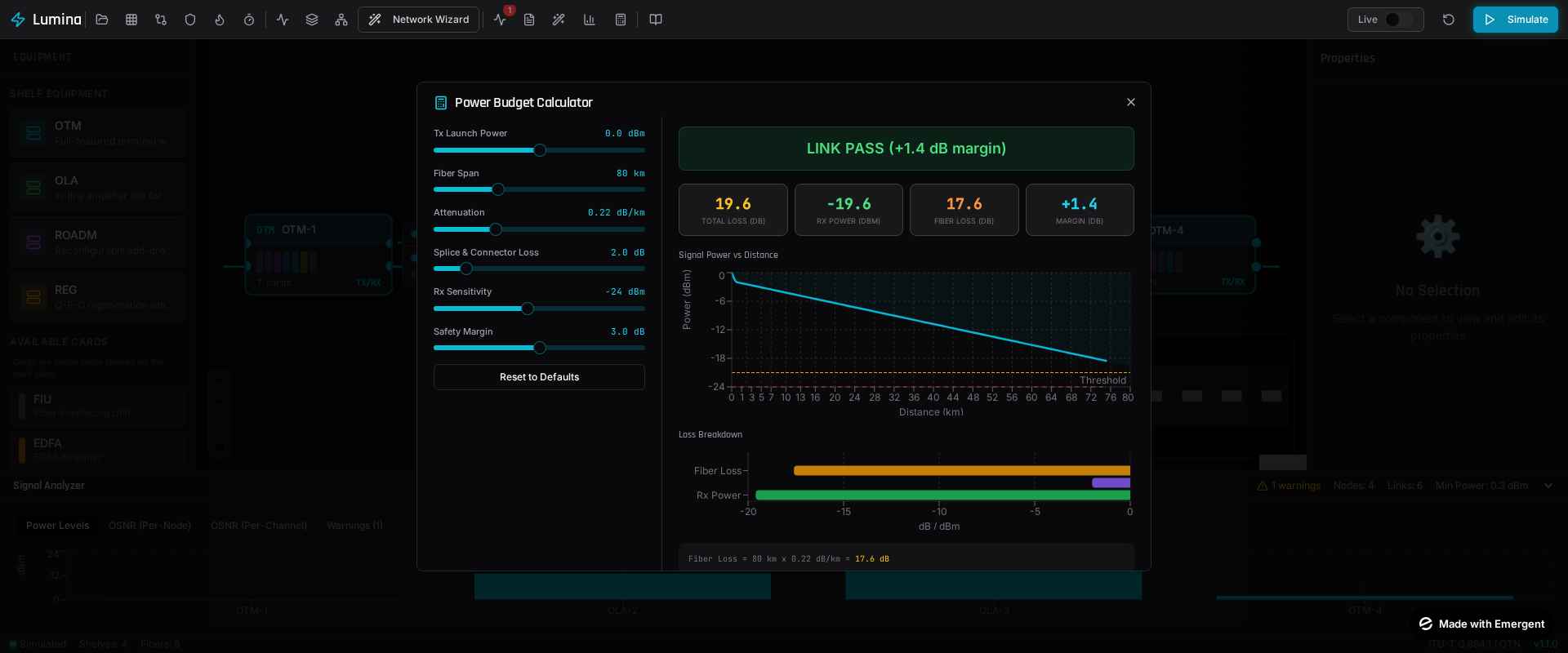
Power Budget Report

Achieve waterfall analysis from TX to RX with margin calculations. VOA Recommendations provide automatic attenuation suggestions when margins are excessive.

DWDM power budget calculator with optical link margin analysis

End-to-end power level analysis.

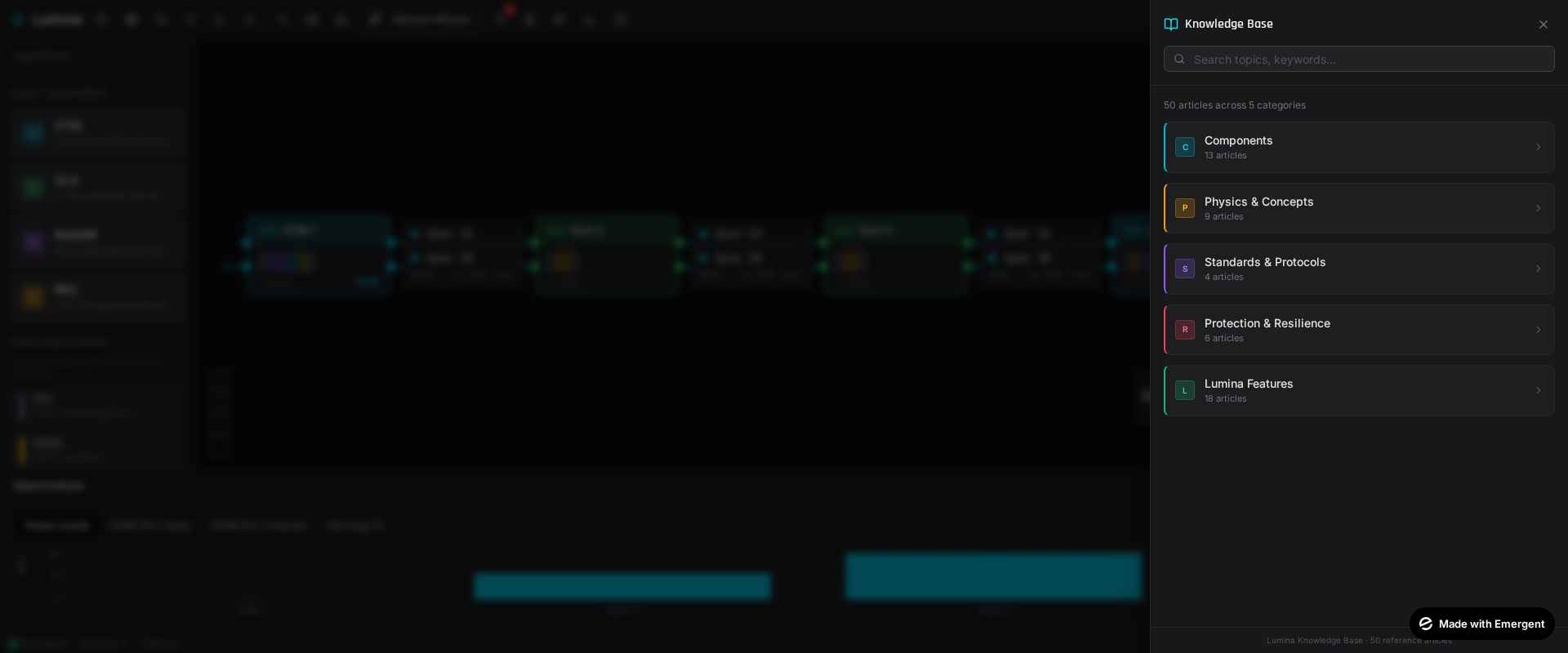
Built-In Knowledge Base

Learn while you design with 50 searchable reference articles covering component specifications, optical physics, resilience protocols, and standard guidelines.

Lumina optical networking knowledge base with searchable technical articles

Built-in Knowledge Base with 50 articles.

Standards Compliance

Standard Coverage
ITU-T G.694.1 DWDM frequency grid (C-band, 100/50 GHz spacing)
ITU-T G.652D Standard single-mode fiber parameters
ITU-T G.709 OTN frame structure, SAPI/DAPI trace bytes
ITU-T G.841 Protection switching (50ms compliance target)
ITU-T G.873.1 Optical linear protection

Technical Specifications

Specification Value
Maximum wavelengths 96 per system on the 100 GHz or 50 GHz grid
C-band channels 44 at 100 GHz spacing, 88 at 50 GHz spacing
Shelf types 4 — OTM terminal, OLA line amplifier, ROADM, regenerator
Card types 16, including transponder, muxponder, and cross-connect client cards
Client port types 11 — GbE, 10GbE, 100GbE, STM-1 to STM-64, OC-3 to OC-192
Simulated parameters Optical power, OSNR, BER, chromatic dispersion, receiver margin
Alarm conditions 18 monitored conditions across power, OSNR, BER, equipment, and fiber
Protection schemes 6 — ASON, SNCP, MS-SPRING, 1+1, 1:1, and mesh restoration
Knowledge base 50 reference articles across 5 categories
Supported platforms Windows 10 and 11, macOS on Intel and Apple Silicon, Linux (Ubuntu 20.04+)
Minimum system requirements 2 CPU cores, 4 GB RAM, 10 GB storage, 1280px display width

DWDM Simulator Questions

What is a DWDM simulator?

A DWDM simulator models a dense wavelength division multiplexing network before deployment. It helps engineers evaluate optical paths, channel power, span loss, amplifier gain, OSNR, receiver margin, and fault behavior.

What can Lumina analyze?

Lumina analyzes optical power budgets, per-channel OSNR, amplifier behavior, span loss, receiver margin, wavelength routing, and network response to injected faults.

Who is Lumina designed for?

Lumina is designed for telecom engineers, optical network planners, trainers, and students who need a visual environment for learning, planning, and validating DWDM networks.

Does Lumina calculate power budgets and OSNR?

Yes. Lumina includes optical power budget reporting and per-channel OSNR analysis so users can inspect signal quality and engineering margin across a designed route.

How is an optical power budget calculated?

An optical power budget starts from transmitter output power and subtracts every loss along the path — fiber attenuation over distance, splice and connector loss, and multiplexer and demultiplexer insertion loss — then adds amplifier gain. The result is compared against receiver sensitivity, and the difference is the engineering margin. Lumina performs this as a waterfall calculation from transmitter to receiver and returns a pass or fail verdict with the remaining margin.

How many DWDM channels does Lumina support?

Lumina supports up to 96 wavelengths per system on the ITU-T G.694.1 grid, which is 44 C-band channels at 100 GHz spacing or 88 channels at 50 GHz spacing.

Which ITU-T standards does Lumina implement?

Lumina calculates according to ITU-T G.694.1 for the DWDM frequency grid, G.652D for standard single-mode fiber parameters, G.709 for OTN framing and SAPI/DAPI trace bytes, G.841 for protection switching against the 50 ms target, and G.873.1 for optical linear protection.

Can Lumina simulate fiber cuts and amplifier failures?

Yes. Lumina injects four fault types — fiber cut, amplifier failure with adjustable severity, power degradation from ageing or bending, and elevated BER. The power budget report, signal analyzer, and topology view all update immediately so the impact on the design is visible before deployment.

What protection and restoration schemes can Lumina analyze?

Lumina evaluates six schemes: ASON in optical and electrical forms, SNCP rings with east and west direction analysis, MS-SPRING on two-fiber and four-fiber rings, 1+1 and 1:1 linear protection, and mesh restoration. Restoration timing is broken down by phase and checked against the ITU-T G.841 target of 50 ms.

What optical equipment does Lumina model?

Lumina uses a shelf and card architecture that mirrors real DWDM hardware. It provides four shelf types — OTM terminal, OLA line amplifier, ROADM, and regenerator — populated from sixteen card types covering fiber interface units, EDFA pre-amplifiers and boosters, AWG multiplexers and demultiplexers, WSS-based ROADMs, optical switches, transceivers, dispersion compensation, attenuators, splitters, regenerators, power meters, and client-side transponder, muxponder, and cross-connect cards.

What should you look for in a DWDM simulator?

A useful DWDM simulator should model the physical layer rather than only draw diagrams. Look for cumulative OSNR tracking through every amplifier stage, power accounting that includes insertion and splice losses, chromatic dispersion with compensation, receiver sensitivity checks, standards-based channel plans, and the ability to inject faults and observe the result. Lumina provides each of these alongside a visual design canvas.

Does Lumina run on Windows, macOS, and Linux?

Yes. Lumina runs on Windows 10 and 11, on macOS for both Intel and Apple Silicon, and on Linux from Ubuntu 20.04 onward. The minimum requirements are two CPU cores, 4 GB of RAM, 10 GB of storage, and a display at least 1280 pixels wide.

Is Lumina free, and how is it licensed?

Lumina is commercial software rather than a free tool. Licensing is flexible and tailored to the buyer, whether an individual engineer, a university department, or a telecom operator, and pricing is quoted on request by email or WhatsApp.

Can Lumina be used for teaching optical networking?

Yes. Lumina is used by trainers and students as well as practising engineers. It ships with a searchable knowledge base of 50 reference articles across components, physics and concepts, standards and protocols, protection and resilience, and product guides, so concepts can be read and then immediately tested in simulation.
Pricing & Contact

Interested? Let's Talk.
Lumina is available with flexible licensing tailored to your needs.

Call for Price